
A Guide to Using LocalStack: Your Local AWS Cloud Environment

What is LocalStack?
LocalStack is an open-source tool that provides a fully functional local cloud environment for developing and testing AWS applications. It emulates many AWS services on your local machine, enabling developers to experiment with, debug, and validate their infrastructure and application code without incurring cloud costs or requiring an active internet connection.
With LocalStack, you can test and deploy infrastructure as code (IaC) setups using tools like Terraform, AWS CLI, and others. It supports a variety of AWS services, such as Lambda, S3, SQS, SNS, DynamoDB, and more, though feature parity with real AWS services varies.
To check the feature parity of AWS services in LocalStack, you can refer to this link :
https://docs.localstack.cloud/user-guide/aws/feature-coverage/
Installing LocalStack
To get started with LocalStack, you need Python installed on your system. Then, install LocalStack via pip:
python3 -m pip install --upgrade localstackTo verify the installation, run:
localstack --versionThis command will display the installed version, confirming that LocalStack is ready to use.

Setting up Terraform
Terraform is often used alongside the localStack for creating and managing infrastructure, Here’s how to set up on Ubuntu/Debian and you can refer this documentation https://developer.hashicorp.com/terraform/install for other installation on different OS :
1. Install Terraform
Update your system and install the required tools:
sudo apt-get update && sudo apt-get install -y gnupg software-properties-commonAdd the HashiCorp GPG key:
wget -O- https://apt.releases.hashicorp.com/gpg | \
gpg --dearmor | \
sudo tee /usr/share/keyrings/hashicorp-archive-keyring.gpg > /dev/null
Verify the key's fingerprint:
gpg --no-default-keyring \
--keyring /usr/share/keyrings/hashicorp-archive-keyring.gpg \
--fingerprint
Add the official HashiCorp repository:
echo "deb [signed-by=/usr/share/keyrings/hashicorp-archive-keyring.gpg] \
https://apt.releases.hashicorp.com $(lsb_release -cs) main" | \
sudo tee /etc/apt/sources.list.d/hashicorp.list
Update your package manager and install Terraform:
sudo apt update
sudo apt-get install terraform
You can verify Terraform installation by checking its version:
terraform --version
2-Install tflocal for Terraform-Local
tflocal is a helper tool to run Terraform with LocalStack seamlessly. Install it using pip:
pip install terraform-localYou can verify the tflocal by checking its version
tflocal version
For more information, visit the tflocal GitHub repository
Using Terraform with LocalStack
Step 1: Start the LocalStack server
Start the LocalStack server by using this command
localstack start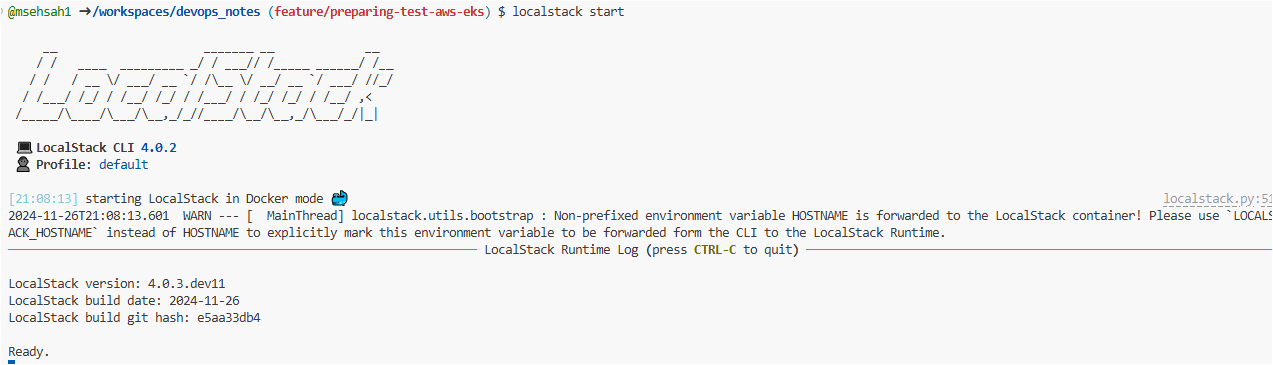
you can check the status using the command status :
localstack status
Step 3 :Check Resource Compatibility
Before creating resources, ensure that your desired AWS services are supported by LocalStack. Refer to the LocalStack feature coverage guide.
Step 2: Prepare Your Terraform Script
Create a standard Terraform script defining your AWS resources, such as S3 buckets or Lambda functions. For example:
resource "aws_s3_bucket" "example" {
  bucket = "my-localstack-bucket"
}
Step 2: Launch tflocal
Run the Terraform commands using tflocal. This tool automates the configuration of endpoints and creates a temporary file localstack_providers_override.tf to override the default provider settings.
tflocal init
tflocal plan
tflocal apply
This ensures that your Terraform resources interact with LocalStack instead of the actual AWS cloud.
The terraform localstack_providers_override.tf will be generated automatically to overide the aws provider configuration

Testing Your LocalStack Setup
After running tflocal apply, you can verify that resources were created in LocalStack using AWS CLI. For example, to check an S3 bucket:
Install AWS CLI:
Configuring AWS Endpoints:
For more details you can check this link :
https://docs.localstack.cloud/user-guide/integrations/aws-cli/
export AWS_ACCESS_KEY_ID="test"

export AWS_SECRET_ACCESS_KEY="test"

export AWS_DEFAULT_REGION="us-east-1"
Confirm that your resources are listed as expected.
aws --endpoint-url=http://localhost:4566 s3 ls
Advantages of LocalStack
Cost Savings: No need for AWS account usage or associated costs.
Faster Iteration: Develop and test infrastructure locally without waiting for real AWS APIs.
Simplified Testing: Mock various scenarios without risking production environments.
References
https://docs.localstack.cloud/getting-started/installation/
https://developer.hashicorp.com/terraform/tutorials/aws-get-started/install-cli
https://developer.hashicorp.com/terraform/install
https://docs.localstack.cloud/user-guide/integrations/aws-cli/
https://developer.hashicorp.com/terraform/language/files/override
https://github.com/localstack/localstack
https://github.com/localstack/terraform-local